Data Ingestion Agent
The Data Ingestion Agent onboards a new system from a plain-language request. You describe what you want to pull, and the agent sets up the source and proposes the pipelines. It onboards API applications, and it also onboards database, SFTP, and email pipelines.
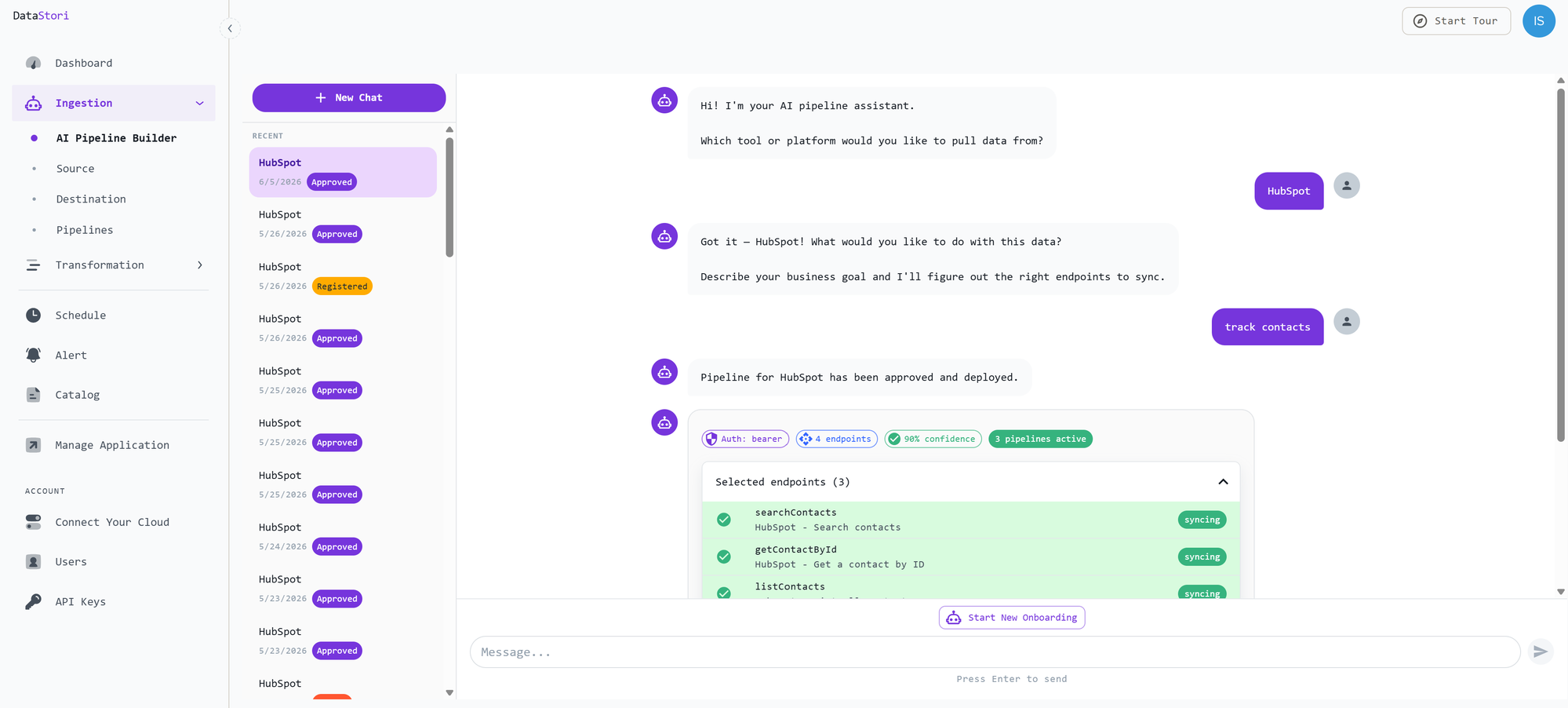
Describe the business use case and the system
Open Add New Application and tell the agent what you need. Name the system and the business goal — for example, "Pull HubSpot contacts and deals into our warehouse." The agent reads the available documentation and identifies the endpoints, authentication, and pipelines required to do that.
Databases, SFTP, and email
The same conversation works for a database, an SFTP folder, or an email inbox. Tell the agent which source to use and which data to pull.
When you onboard a database, you can also give the agent extra metadata about the data. The agent uses that information when it proposes the pipeline.
Review what the agent proposes
Before anything is created, the agent shows the choices it made:
- the endpoints it selected
- how authentication is configured
- how confident it is in each choice
Check these before you approve. Reply in the chat to change the selection, or adjust the application and its modules yourself. Add New Application describes that structure and the manual steps.
Approve and deploy
When the proposal looks right, approve it. DataStori creates the pipelines and deploys them. The new application then appears under Sources, where you can use it to build further pipelines and extend the data catalog.